Create SNS via Toolkit

,

Introducing SNS Creation in Toolkit

Until now, launching a Service Nervous System (SNS) has mostly been a developer’s task. If you’ve ever looked at the DFX command-line instructions, you know how overwhelming it can be: editing YAML files by hand, running a series of commands in the right order, making sure your environment is set up correctly, and hoping nothing breaks along the way. For many communities and project founders, this technical barrier meant that starting an SNS felt out of reach.

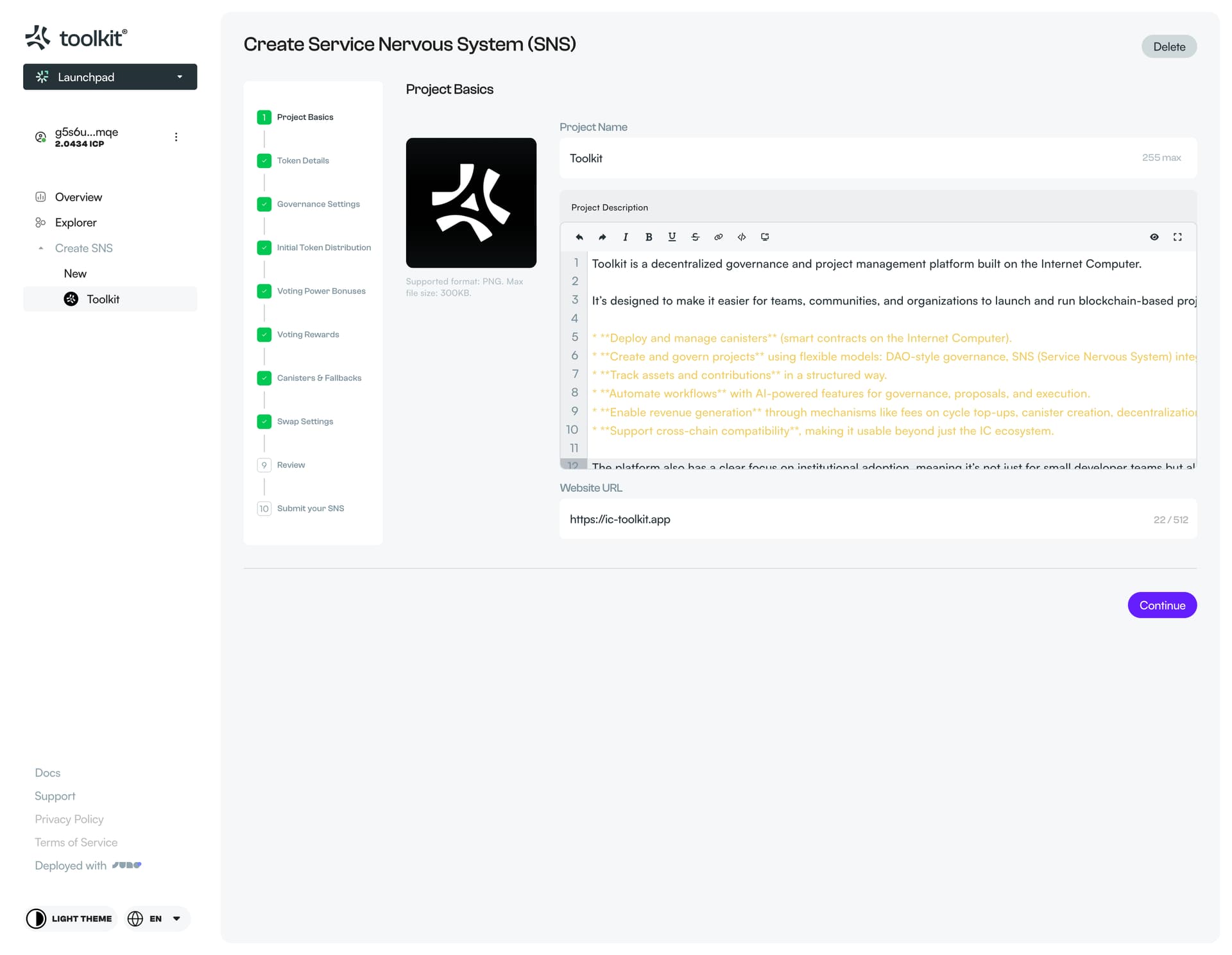
With Toolkit, that changes. We’ve built a simple, intuitive UI that guides you through SNS creation step by step. No terminals, no obscure error messages, just clear forms, helpful explanations, and an end-to-end flow that anyone can follow. Whether you’re a developer or not, you can now create an SNS for your project directly in Toolkit. And since every step is saved as a draft, you don’t need to complete the whole process in one sitting, you can come back at any time and pick up right where you left off.

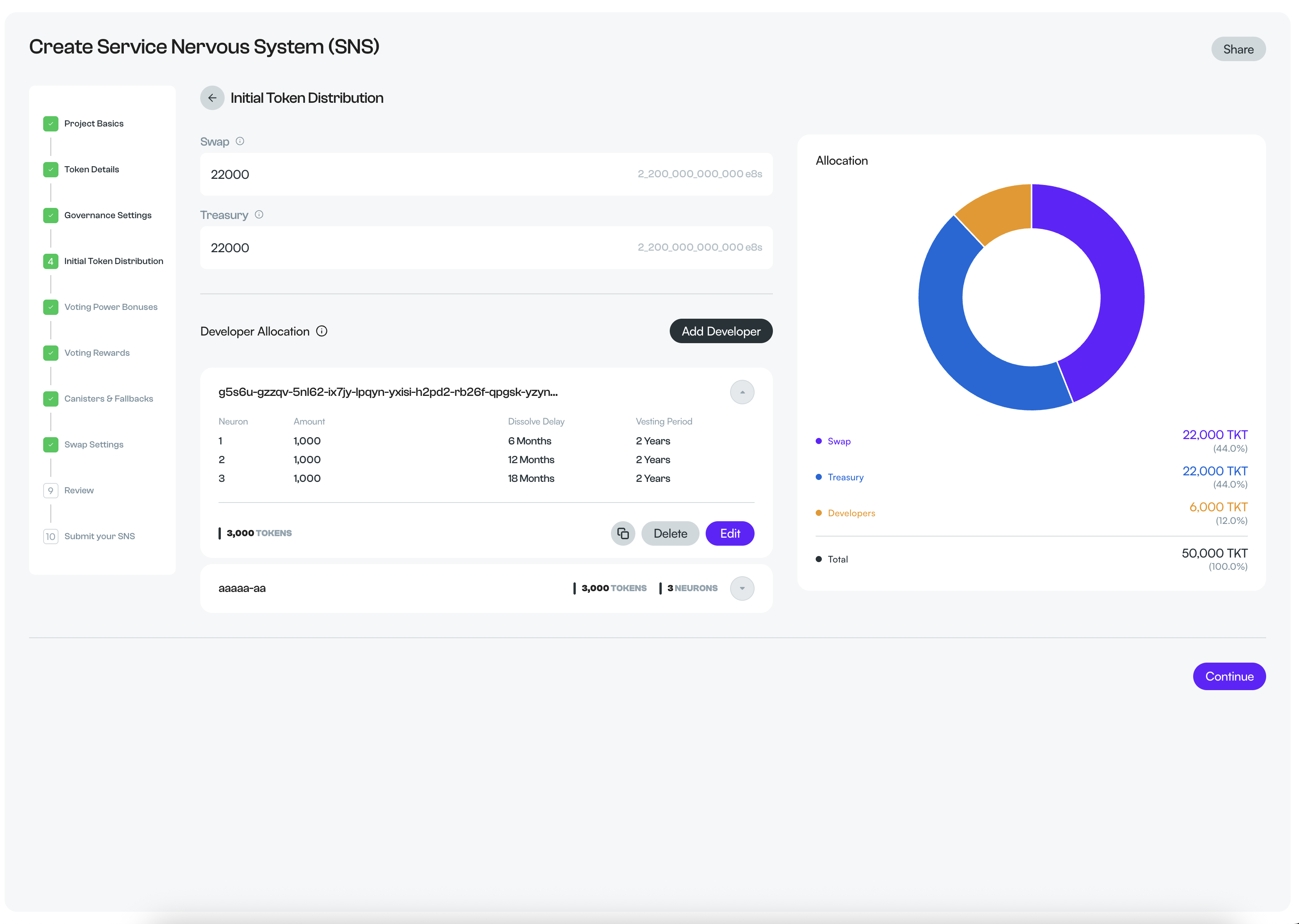
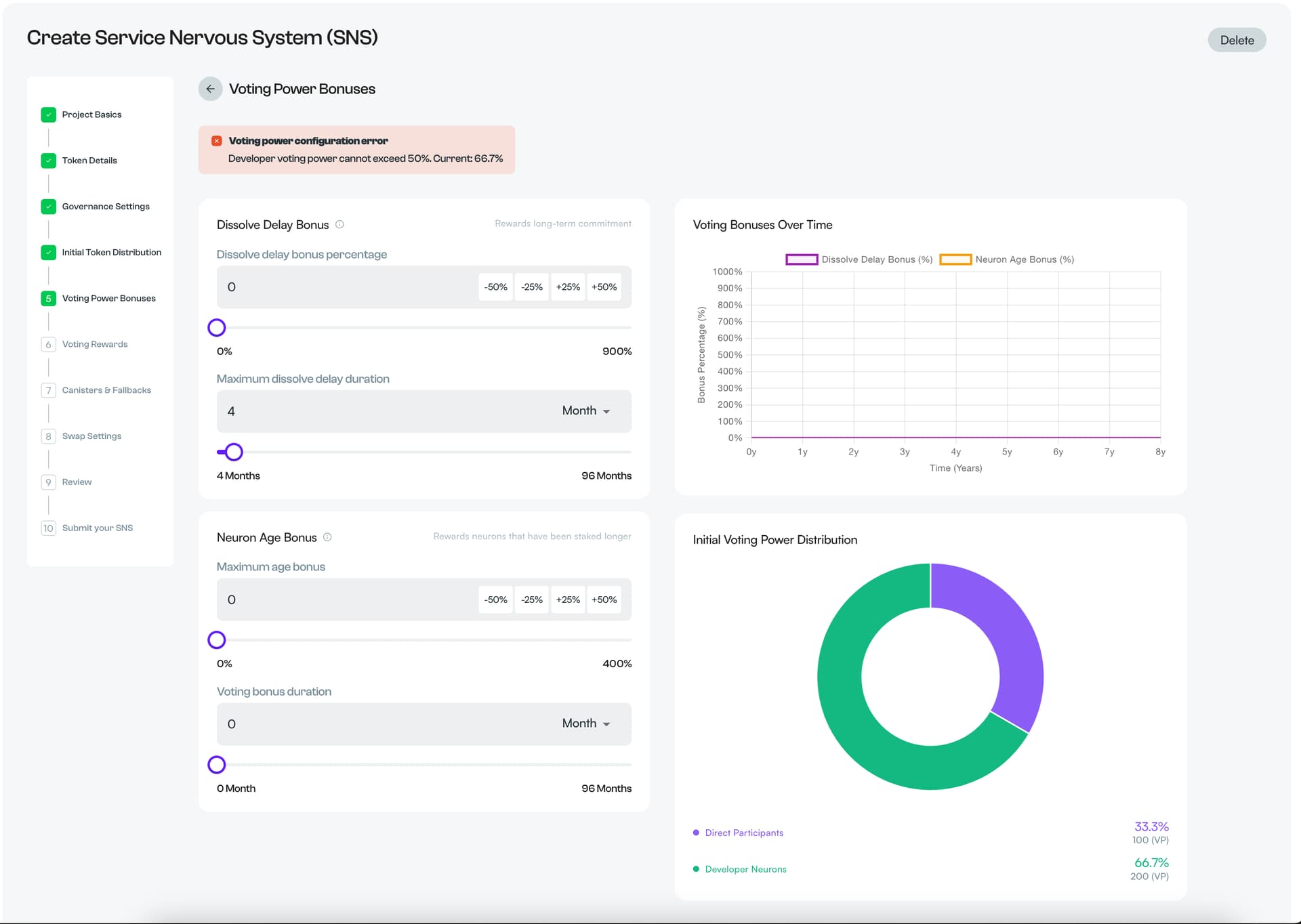
We’ve also added charts that update in real time as you enter your configuration. This makes it easier to see how your choices will affect governance, token distribution, and community dynamics. We did our best to model this according to how SNS data is processed today, but we’d love extra confirmation from someone on the SNS team to verify that everything matches 100%.

Toolkit’s SNS creation flow is built around the rules Dfinity has set. For example, it is strongly encouraged to let the community review your SNS before launch. We guide you through this step without blocking you if you decide not to. If you choose to put your SNS up for review, Toolkit generates a public link to share your configuration (no YAML required). A 2-week countdown is shown on the review page, and it resets each time you make changes while in review.

When you’re ready to propose, Toolkit asks for the proposal summary required by the NNS. If you already have an eligible neuron (with at least a 6-month dissolve delay and 25 ICP stake), you can use it directly. Otherwise, you can transfer 25 ICP to your Toolkit principal and we’ll handle the neuron creation and proposal submission on your behalf. Just like any other proposal, if your create-SNS proposal is accepted, you’ll regain control of the 25 ICP neuron under your Toolkit principal. If it’s rejected, the 25 ICP will be burned.

This is the first version of the feature, and we know there’s room to improve. We’re especially looking for feedback on clarity, usability, and accuracy. Your input will help us make SNS creation as smooth and accessible as possible.

Our goal is to make decentralization available to everyone. With this release, communities can focus on their vision and governance, not the technical hurdles.

You can find this feature under the launchpad on toolkit, note that you need to be signed it to see the feature

Below is an example of the public accesible review page that can be shared on the forum;
https://ic-toolkit.app/launchpad/sns/g5s6u-gzzqv-5nl62-ix7jy-lpqyn-yxisi-h2pd2-rb26f-qpgsk-yzynz-mqe/1

Project details
Token details
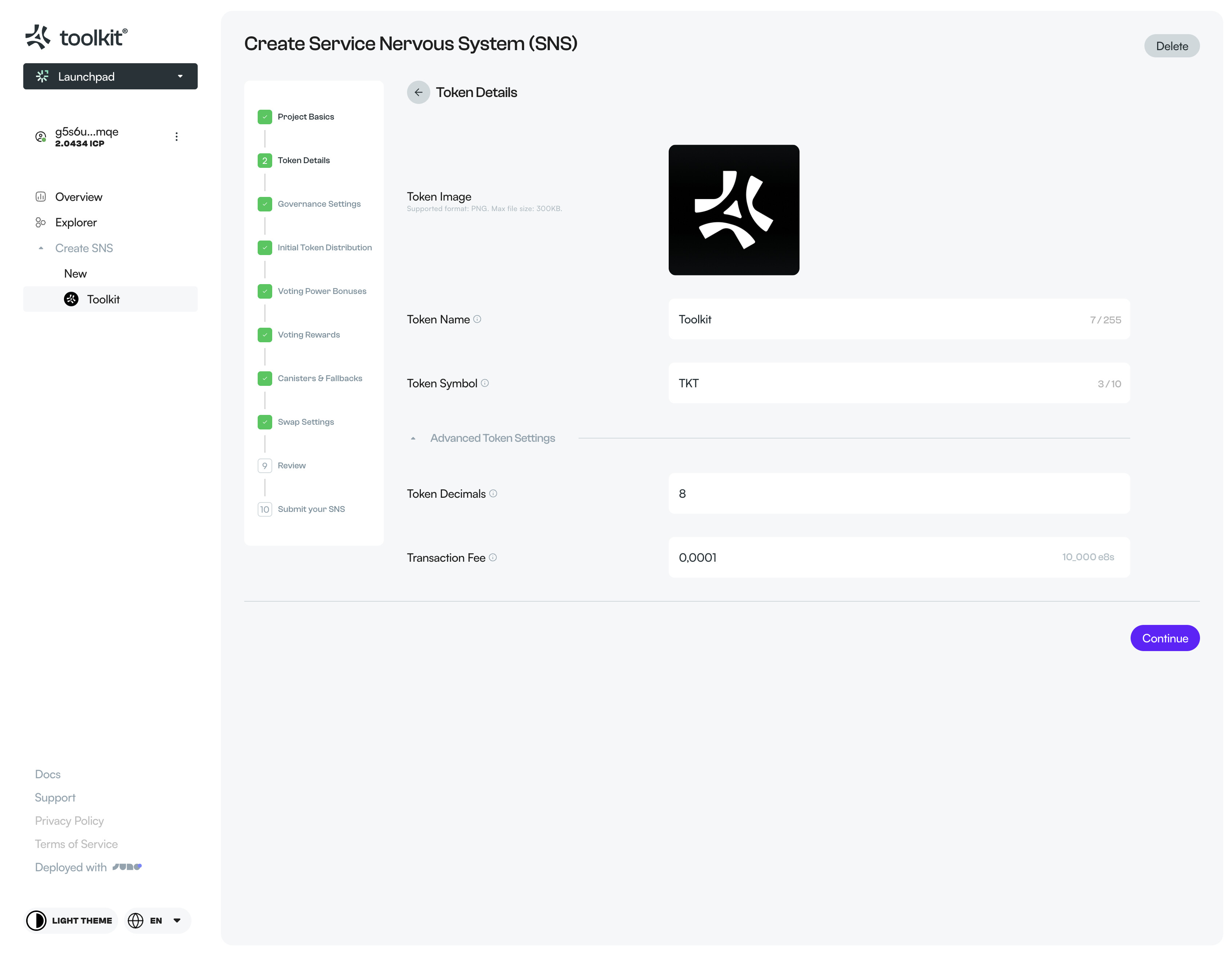
Governance settings
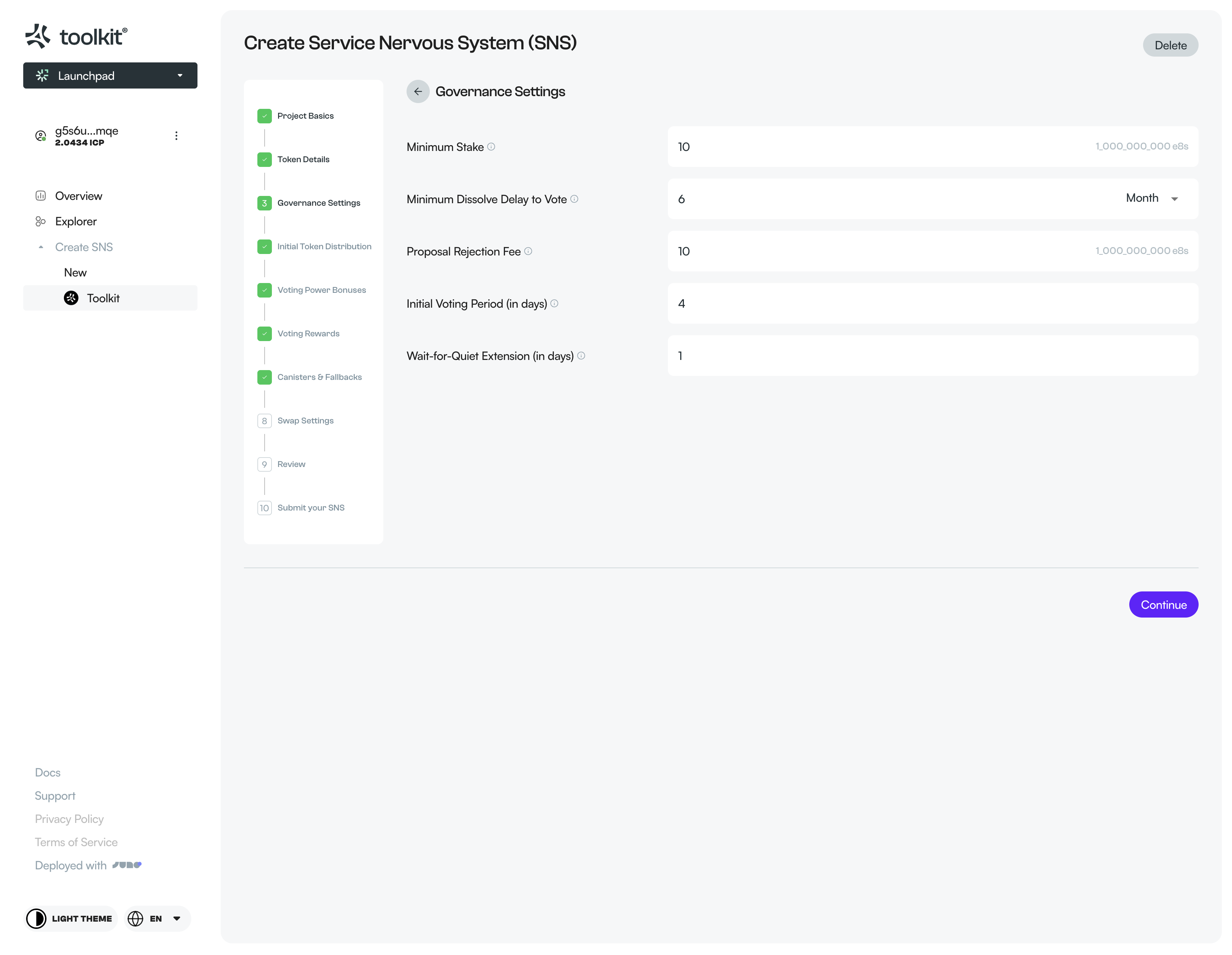
Initial token distribution

Voting power bonusses

Voting rewards
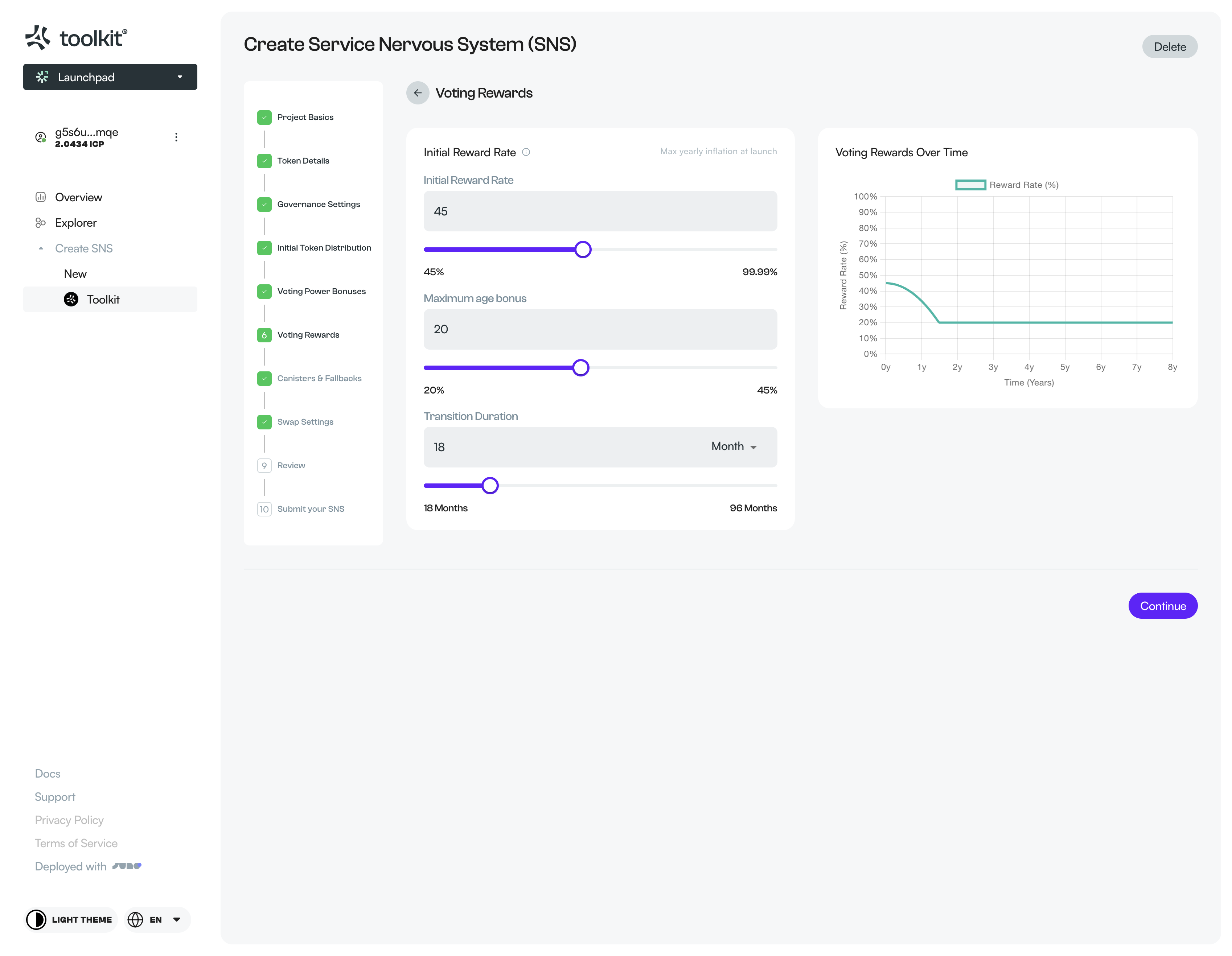
Canisters and fallbacks

Swap settings

Review

Final step
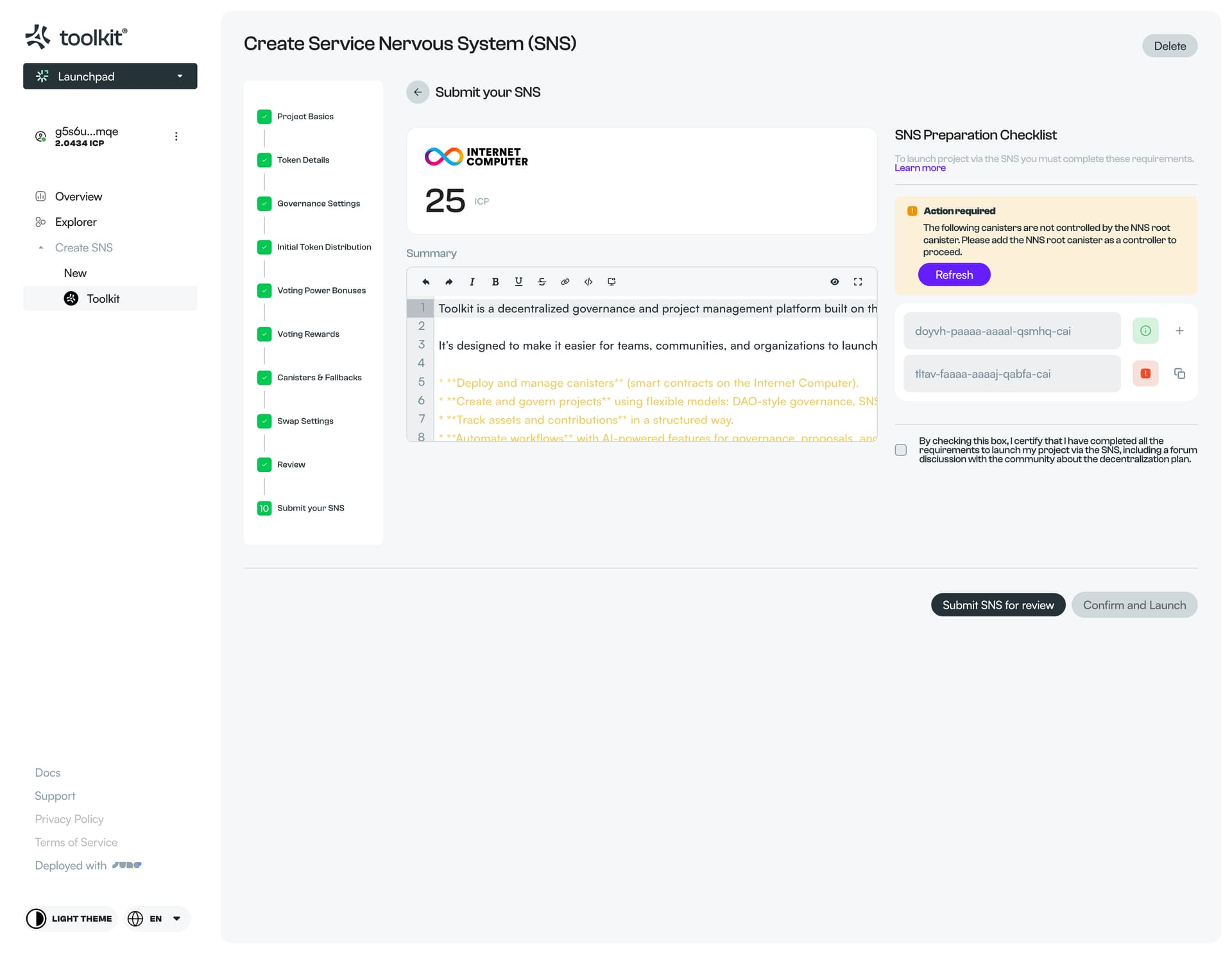
Submit SNS for Review

39 Likes

great work @rem.codes :clap:

please consider adding this also here → 📢 Call for Ecosystem Updates – Developer Newsletter #6

6 Likes

Looks clean as well! :smiling_face_with_sunglasses:

1 Like

That’s awesome! I remember the trials of doing SNS without this. :sweat_smile:

1 Like

Looks great - and you are correct in saying that setting up the SNS parameters is a barrier to entry for newbies and seasoned developers alike.

This is certainly pushing ahead in the right direction.

2 Likes

Uau, big congrats!!

This is great craftsmanship, I stand in awe :open_mouth: :person_bowing:

I have followed your work, and this was a very hard thing to do. The subtlety is in the details, thank you so much for the time you and your team spent on designing and redesigning.

A few precious gems that I would like to highlight (and there are many more).

:gem_stone: 1 - Setting up Neurons, notice that duplication of the whole “strategy”. Genius!

:gem_stone: 2 - The use of graphs when they are critical for having a better sense of the param impact. The use of subtle cues, like this differentiation between the Age and Delay bonus (which is a hell to explain to newbies!! But it’s so nicely put here :open_mouth:)

:gem_stone: 3 - Creating an SNS is a very complex and serious action, which would cause “brain melting” if you would submit them all in a single go. But Toolkit team broke it down into 10 steps, going from the most obvious / “easy”, to the ones that you would only have them “ready” closer to submission, like setting the root of the SNS to be controller of the DAO canisters. And each step comes with an easy “continue” (save) and “delete” (reset) buttons, that allows you to do it with time, at your own pace.

:gem_stone: 4 - The review screen.
I had forgotten about the 14 day review period, but not only you reinforce this best practice, you also made it super easy to share and for others to review it. From Dfinity staff to NNS voters.
Also you reset the counter if a config is changed, amazing :star_struck:

And I could go on and on. This is so much better than the “yaml” + “scripts” / “commands” mode, that I would easily predict that the majority of future SNS Launches would use this service, big congrats, big win :clap:

Thank you once again for your hard work on solving so elegantly such a cumbersome problem :folded_hands: :person_bowing:

8 Likes

Thanks for the kind words! Really appreciate it!

2 Likes

Amazing job!

One question for you, can a project go live in the SNS and restrict participation to founders only say 51% and the rest to contributors? Meaning can an SNS project be safe from a hostile takeover?

1 Like

You can set up developer (founder) neurons, but the do come with some restrictions;

  1. the total developer neuron token amount can’t be more then the swap amount (so 51% dev neurons is not possible)

  2. Within toolkit we do actively block going forward if the initial developer voting power is over 50%, this is something that the SNS framework does allow but usually gets shot down during the review.

5 Likes

Thanks, the conclusion seems to be that the current SNS system aims for developers to have less than 50% of any raised capital, which means any whale can take over their project.

Hard pass.

3 Likes

This was the benefit of the neuron fund, you had an extra allocation that was distributed and becoming more decentralized, right now the mechanic is a bit broken imo because there are only 2 allocations that have voting power (developers and swap participants)

You are talking about a whale taking over, but developers with 51% could also harm or try to drain the project. If they would take 50% and buy up an other 17% they they can drain all the funds from the treasury.

It’s a delicate balance.

4 Likes

Dishonest developers, yes those exist, but the current status makes honest developers avoid the SNS as it stands now.

In the VC world there are contracts, and developers seldom if ever drain funds. Why can’t we learn from SAFE, a simple yet effective way to get funds and let builders build? It’s a simple and effective contract for early startups.

https://venturecapitalcareers.com/blog/safe

2 Likes

@rem.codes This is really awesome, thank you for making this! Launching SNSes has always been a fairly big lift.

Do you think there’d be interest in a version of the SNS that didn’t require a decentralization sale (i.e. you just start building a community and a dapp against an SNS and worry about decentralizing later, but are able to start with full integration into the token and governance?) I’ve been wondering if this would be a better path for smaller communities and dapps to get traction, before they seek larger amounts of funding through decentralization.

5 Likes

Hey @msumme,

This is something we definitely have on our roadmap, to give some context, we are currently designing out our “toolkit projects” UI which enables people to collaborate on projects (multi canister dapps) with its own governance system, this could be based on role / permission structure, member voting or just a flat organization style.

For actual decentralization we aim to have 3 options;

  1. The official SNS that we launched now
  2. An alternative to the SNS that doesn’t require the terms set by dfinity (a copy of the SNS framework)
  3. A custom “toolkit decentralization” build and maintained by the toolkit team.

So the flow could be that you create a toolkit project and once it’s mature enough you can decentralize it via one of the 3 options above.

4 Likes

Sounds awesome @rem.codes! I think Toolkit is perhaps the most exciting project I’ve seen on the IC so far.

Do you think it would be feasible to make it easy to allow teams to launch governance token distributions that are mined over a very long timeframe (rather than just during an SNS sale). Mining could take the form of burning ICP, or other mechanisms that could benefit the wider ecosystem.

I am open for suggestions and definitely supporting good ideas like this one. The only thing I don’t have is a crazy amount of time to implement out-of-scope features.

We can definitely discuss this to fiddle out the details and maybe try to fit it in.

Else, toolkit is thinking about doing an SNS when / if it makes sense, if that would be the case everybody is free to add what they want as long as the community agrees

1 Like

Yes, I think this would be easy to support, but we could also just modify the SNS so that it has some way of determining if it’s an “officially launched SNS” or an “independent SNS”, since it already controls its own upgrades.

It might also be possible to have a decentralization for an SNS that is already operating, so that there wouldn’t be any additional integrations needed, just some canister migrations and automated inspections to ensure that it’s ready for a decentralization swap.

1 Like