Using agent-js with custom domain error

There are cleaner and more generic function, see Juno’s code for example but, this is just a quick & win suggestion that might do the tricks

Note also that if I get it right, in next version of agent-js the host will be set per default. Don’t know if correct and when this release would be scheduled.

Ok the gitignore is also autogenerated but I will leave the declarations uncommented.

So in my frontend I need to replace everywhere I use this:

And anywhere I use my player canister?

It’s a lot of changes :cry:

So if I wait for the agent-js update it’ll work after that? Having the domain setup would be cool but I don’t want to break the app just before the gameweek starts with little time to test.

I think so, assuming what I said is correct.

I think I read that on discord. @anon74414410 mentionned that next version of the agent will set per default the mainnet host and display a warning or something.

Would upgrading from my current:

@dfinity/agent”: “0.15.6”

to

one of these:

Make a difference at all?

Not absolutely sure of the issue nor of the solution but I would answer: no

1 Like

Ok was just making sure I hadn’t missed something basic.

The PR in question is here: feat: HttpAgent now uses a default address by krpeacock · Pull Request #751 · dfinity/agent-js · GitHub

It was only merged last week but the last release was a month ago so it won’t be there until the next release. You could link the master branch with NPM: package.json | npm Docs

1 Like

I’ll do a release tomorrow

2 Likes

Hi Kyle,

Just wondering if you had an update on this?

Kind regards,
James

Yes, you can install 0.19.1 now and it has the default host. The best recommendation still is to set the host explicitly in your code, however

Thanks Kyle, I will update now. Would you be able to point me in the direction of the documentation in relation to setting the host explicitly in my code and I will implement it the recommended way.

Kind regards,
James

Hi Kyle,

Thanks for this but my site is now down:
https://bgpwv-eqaaa-aaaal-qb6eq-cai.icp0.io/

I get the same error on the custom domain I am trying to connect too:
https://openfpl.xyz/

The error is:
image

I have updated the related packages:

image

and added the domain to the CSP:

My codebase is here:

Any help would be appreciated.

Kind regards,
James

You need to add icp-api to the Content Security Policy header in your ic-assets.json file.

Hi mate, Thanks I’ve got it up and running.

I’ll suggest to the team that we include icp-api by default in the assets canister. Thanks for reporting back!

Hey I’ve got a few other projects that I’m trying to add a domain to now I have the code. I’ve followed the same instructions for this app:

footballgod.xyz

unfortunately I get the same domain error.

The github for this one is here:

Here are the steps I followed:

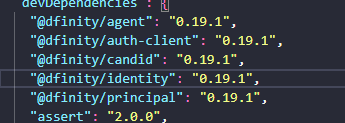
  1. Upgraded the dev dependencies:
    image

  2. Updated my webpack:

  3. Updated the CSP:
    image

  4. Added ic-domains:
    image

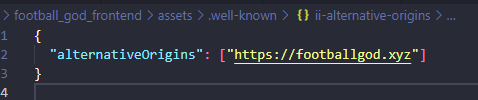
  5. Added ii_alternative-origins:
    image

  6. Updated my auth context:

  7. And my login function:
    image

  8. Files appear in my dist before upgrading the canister:
    image

If you could let me know what part of this process I’m missing that would be great, I’m also trying to do 8yearsgang.io but again I get the decode error.

Any help would be greatly appreciated.

It appears that your files are incorrectly located according your screenshots. The files should be present directly under the folder .well-known not under sub-directores.

Good:

/.well-known/ic-domains
/.well-known/ii-alternative-origins

Bad:

/.well-knwon/ic-domains/ic-domains
/.well-known/ii-alternative-origins/ii-alternative-origins

Ok will try it without the sub folders but OpenFPL has them in sub folders.