ICP JavaScript SDK v4.0.0 is released!

We have released v4.0.0 of the ICP JavaScript SDK libraries. This major release introduces the new unified @icp-sdk/core package, consolidating multiple @dfinity/* packages into a single solution.

What’s New

The only change in v4.0.0 is the introduction of @icp-sdk/core, which unifies the following packages:

  • @dfinity/agent
  • @dfinity/candid
  • @dfinity/identity
  • @dfinity/identity-secp256k1
  • @dfinity/principal

All the functionalities of the @dfinity/* packages are now re-exported and available through their respective @icp-sdk/core/* submodules, providing better tree-shaking support and a more cohesive developer experience. The following table is a summary of how the submodules have been organized:

Old Package New Submodule
@dfinity/agent @icp-sdk/core/agent
@dfinity/candid @icp-sdk/core/candid
@dfinity/identity @icp-sdk/core/identity
@dfinity/identity-secp256k1 @icp-sdk/core/identity/secp256k1
@dfinity/principal @icp-sdk/core/principal

Nothing else has changed compared to the v3, making the migration to the new package simple and fast!

For detailed upgrading instructions, see our V4 Upgrading Guide.

Automatic Migration Tool

We’ve made upgrading as smooth as possible with our new CLI migration tool:

npx @icp-sdk/core-migrate@latest

This tool automatically updates your imports and package dependencies!

For more information, see our V4 Upgrading Guide.

Package Deprecation

As previously announced, @dfinity/use-auth-client has been deprecated. We recommend migrating to more adopted packages like:

Unified Documentation Portal

As part of this rebranding initiative, we’re also unifying the documentation for all ICP JavaScript libraries under the single js.icp.build portal. Each @icp-sdk/* package will have its dedicated documentation path on the portal (e.g., js.icp.build/core/, js.icp.build/auth/, etc.), providing developers with a centralized location to find comprehensive documentation and guides for all ICP JavaScript tools.

This opens new possibilities even for community contributions: in the future, libraries created and maintained by the community could also find their place in the unified docs portal!

Visit the new js.icp.build portal!

Future Work

  • Rename the source code repo dfinity/agent-js into dfinity/icp-js-core as part of the ongoing rebranding initiative (done)
  • @dfinity/assets and @dfinity/auth-client will be included in new @icp-sdk/* packages as part of the ongoing rebranding initiative
  • Additional ICP JavaScript libraries will migrate to the @icp-sdk/* namespace in the near future
  • Continued improvements to the developer experience and the docs
  • Further in the future: deprecation of the @dfinity/agent, @dfinity/candid, @dfinity/identity, @dfinity/identity-secp256k1 and @dfinity/principal packages, in favor of a bigger rework of @icp-sdk/core package
17 Likes

Can I migrate directly from version v2 to v4?

You can do that, although it’s not recommended.

v2 to v3

V3 had some breaking changes compared to v2 (see the v3 upgrading guide), so you first need to sort them out in your source code.

v3 to v4

Upgrading from v3 to v4 should just be a simple, single step. You just have to switch packages and change the imports.
The new CLI migration tool can help you with that:

npx @icp-sdk/core-migrate@latest

You can find more details about the CLI in the v4 upgrading guide.


To summarize, the biggest effort is in upgrading from v2 to v3. Once you’ve done that, you’ll have v4 (almost) for free.

3 Likes

I attempted to upgrade the code to v4, but I have installed numerous libraries from ic-js, which prevents me from using npx to upgrade.

 Starting migration to @icp-sdk/core...

📦 Found @dfinity dependencies to migrate: @dfinity/agent@^3.2.2, @dfinity/candid@^3.2.2, @dfinity/identity@^3.2.2, @dfinity/principal@^3.2.2

Step 1: Removing old @dfinity dependencies...
Removing dependencies: @dfinity/agent, @dfinity/candid, @dfinity/identity, @dfinity/principal
npm error code ERESOLVE
npm error ERESOLVE could not resolve
npm error
npm error While resolving: @dfinity/cmc@5.0.8
npm error Found: @dfinity/agent@3.2.2
npm error node_modules/@dfinity/agent
npm error   peer @dfinity/agent@"3.2.2" from @dfinity/auth-client@3.2.2
npm error   node_modules/@dfinity/auth-client
npm error     @dfinity/auth-client@"^3" from the root project
npm error   peer @dfinity/agent@"3.2.2" from @dfinity/identity@3.2.2
npm error   node_modules/@dfinity/identity
npm error     peer @dfinity/identity@"3.2.2" from @dfinity/auth-client@3.2.2
npm error     node_modules/@dfinity/auth-client
npm error       @dfinity/auth-client@"^3" from the root project
npm error
npm error Could not resolve dependency:
npm error peer @dfinity/agent@"^2.0.0" from @dfinity/cmc@5.0.8
npm error node_modules/@dfinity/cmc
npm error   @dfinity/cmc@"^5.0.8" from the root project
npm error
npm error Conflicting peer dependency: @dfinity/agent@2.4.1
npm error node_modules/@dfinity/agent
npm error   peer @dfinity/agent@"^2.0.0" from @dfinity/cmc@5.0.8
npm error   node_modules/@dfinity/cmc
npm error     @dfinity/cmc@"^5.0.8" from the root project
npm error
npm error Fix the upstream dependency conflict, or retry
npm error this command with --force or --legacy-peer-deps
npm error to accept an incorrect (and potentially broken) dependency resolution.
npm error

For now, ic-js packages are still on agent-js v2. Between this week and the next, a release will be made to bump their deps to v3. I would recommend you to wait until then.

3 Likes


https://js.icp.build/core/latest/quick-start
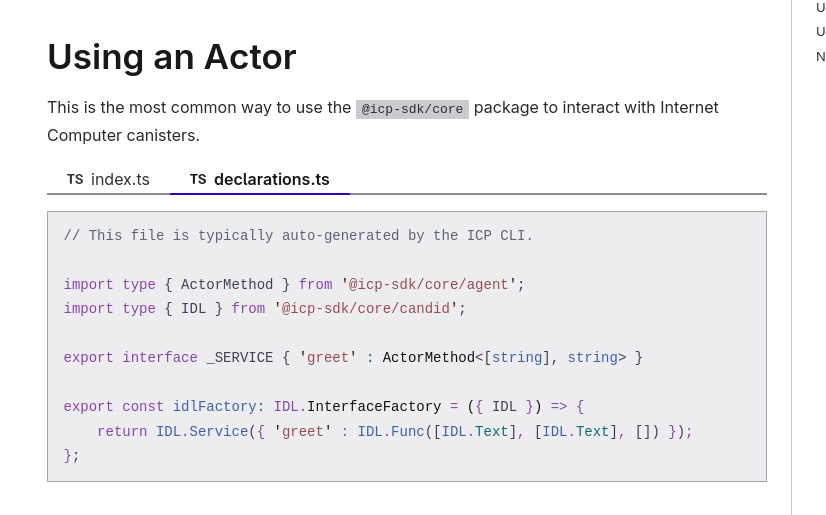
In the documentation, I see that in the example declarations.ts, it imports @ic-sdk/core, but in my project, what I get from dfx generate still imports @dfinity/agent. My dfx version is v0.29.0.

What should I do to make the declarations generated by dfx also use the new version of @ic-sdk/core ?

Not all hero’s wear capes, hopefully this will finally resolve the dependency hell

2 Likes

Indeed, this was one of the main reasons behind unifying packages under a single, module-based package!

2 Likes

For now, you can write a little script that finds and replaces the @dfinity/* occurrences with their respective @icp-sdk/core/* submodule:

#!/bin/bash

# Replace @dfinity/* imports with @icp-sdk/core/* in declarations folder
find ./declarations -name "*.d.ts" -o -name "*.js" | xargs sed -i '' \
  -e 's/@dfinity\/agent/@icp-sdk\/core\/agent/g' \
  -e 's/@dfinity\/candid/@icp-sdk\/core\/candid/g' \
  -e 's/@dfinity\/principal/@icp-sdk\/core\/principal/g'

dfx generate will be updated later to support the new package.

3 Likes

@e274426380 The dfinity/ic-js libraries have been updated to use the v3 version of the dfinity/icp-js-core libraries.
This should make them compatible with the v4 version of the dfinity/icp-js-core libraries as well.

2 Likes

Hey! Having typescript issue with this sdk.

As per documentation

`In your tsconfig.json file, set the moduleResolution to either node16, nodenext, or bundler`

However imports fail for `bundler` option, using node16 or nodenext is not really possible in mobile env, as it fails bunch of other imports.


And another question:

Old library seemed to have this method exported
import { fetchCandid } from ‘@dfinity/agent’

Cannot figure out how to import it from @icp-sdk/core

Maybe you have some ideas, thank you!

Can you provide the TS error that you get? Could you also provide your tsconfig setup?

You should be able to just import it from the @icp-sdk/core/agent submodule:

import { fetchCandid } from '@icp-sdk/core/agent';

In general, for the v4 all what was exported from @dfinity/agent is now exported from @icp-sdk/core/agent. More info in the v4 upgrading guide.

@fochive00 We’ve now released the package that generates the new bindings with the updated import:

2 Likes

@e274426380 The ic-js libraries have been updated to use the latest version (v4 today) of the dfinity/icp-js-core library, see:

2 Likes

After updating to v4, I receive numerous warnings about dependencies failing to import.
Following the documentation’s advice to set it to node16 caused multiple version conflicts, such as:
194 │ ┌ :-webkit-autofill,
195 │ │ [type=“color”],
196 │ │ [type=“date”],
197 │ │ [type=“datetime-local”],
198 │ │ [type=“month”],
199 │ │ [type=“time”],
200 │ └ [type=“week”]
╵Warning on line 449, column 7 of node_modules\quasar\src\components\field\QField.sass:
This selector doesn’t have any properties and won’t be rendered.

This is likely because my project dependencies are outdated and haven’t adopted the latest packages.
Numerous bugs prevent me from updating to v4 in the short term. I’ll attempt it when I have more time later.

According to your stack trace, the issue is related to your stylesheets. Therefore, I would say the error is unrelated to upgrading to v4, but rather to other libraries that you potentially upgraded at the same time such as sass.

Yes, I addressed numerous issues, such as downgrading the Sass version and rewriting the ts.config. However, this led to even more problems. The final issue I encountered was:

frontend/views/home/modules/Welcome.vue:63:23 - error TS2339: Property ‘scrollToPredictions’ does not exist on type ‘{}’. 63               @click=“scrollToPredictions”
frontend/views/home/modules/Welcome.vue:84:20 - error TS2339: Property ‘animatedAccuracy’ does not exist on type ‘{}’.84                 {{ animatedAccuracy }}%           
frontend/views/home/modules/Welcome.vue:92:20 - error TS2339: Property ‘animatedAssets’ does not exist on type ‘{}’.92                 {{ animatedAssets }}+
frontend/views/home/modules/Welcome.vue:100:20 - error TS2339: Property ‘animatedPredictions’ does not exist on type ‘{}’.100                 {{ animatedPredictions }}+
frontend/views/home/modules/Welcome.vue:175:17 - error TS2339: Property ‘scrollToPredictions’ does not exist on type ‘{}’.175         @click=“scrollToPredictions”
frontend/views/home/modules/Welcome.vue:183:45 - error TS2792: Cannot find module ‘vue’. Did you mean to set the ‘moduleResolution’ option to ‘node’, or to add aliases to the ‘paths’ option?183 import { onMounted, onUnmounted, ref } from “vue”;
frontend/views/home/modules/Welcome.vue:189:21 - error TS2503: Cannot find namespace ‘NodeJS’.

Therefore, I believe this update involves numerous changes and should be postponed until a later time when there is sufficient availability to re-execute the update.

None of the above issues are related to the@dfinity or @icp-sdk libraries. It feels more like loose TypeScript typings, but it’s hard to tell more.

This above issue seems to be related to a “misusage” of NodeJS types on the frontend side or the lack of related types (@types/node). Unrelated to the migration library as well.

Did you set the moduleResolution in your tsconfig.json to bundler?

yes, i seted bundler.
I believe the main reason is that most of the dependencies I’m using are quite outdated and incompatible with newer versions.